2023. 10. 16. 05:27ㆍ카테고리 없음
Fast API router
앞선 글에서 아래와 같이 API를 작성하는 법에 대해 알아봤습니다.
from fastapi import FastAPI

app = FastAPI()

@app.get("/")
async def root():
    return {"first": "first"}
소규모의 API를 만들 때는 위와 같은 방법을 유지해도 괜찮겠지만, 규모가 커진다면 유지보수가 매우 힘들어질 것입니다.
따라서 router를 이용하여 보다 효율인 코드를 작성하는 것이 좋습니다.
먼저, main.py 파일이 있는 디렉토리에 routes.py 파일을 생성한 후 아래와 같은 코드를 작성해봅니다.
from fastapi import APIRouter

router = APIRouter()

@router.get("/second")
async def second():
    return {"second": "second"}
위와 같이 코드를 작성하면, API 작성이 완료됩니다.

하지만 API 문서를 보면 방금 작성한 API가 보이지 않는 것을 확인할 수 있습니다. main.py를 실행시켰기 때문에 main.py에 등록을 해야 사용할 수 있습니다. main.py에 다음과 같이 등록을 할 수 있습니다.
from fastapi import FastAPI
from routes import router as second

app = FastAPI()

@app.get("/")
async def root():
    return {"first": "first"}

app.include_router(second)
그러면 아래 그림2와 같이 API를 확인할 수 있습니다.
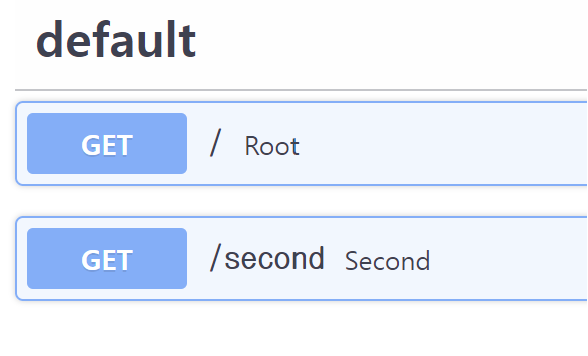
위와 같은 방법을 사용한다면 API를 기능별로 관리하기 훨씬 수월해질 것입니다. 하지면 여전히 비효율적인 면이 있습니다. 기능별로 분리했다면 URL의 겹치는 부분이 생길텐데, 이 부분을 매번 작성한다면 매우 비효율적입니다. 이런 점을 다음과 같이 개선할 수 있습니다. 먼저, routes.py 파일에 다음과 같이 코드를 추가합니다.
from fastapi import APIRouter

router = APIRouter(
    prefix="/common"
)

@router.get("/second")
async def second():
    return {"second": "second"}

@router.get("/third")
async def third():
    return {"third": "third"}
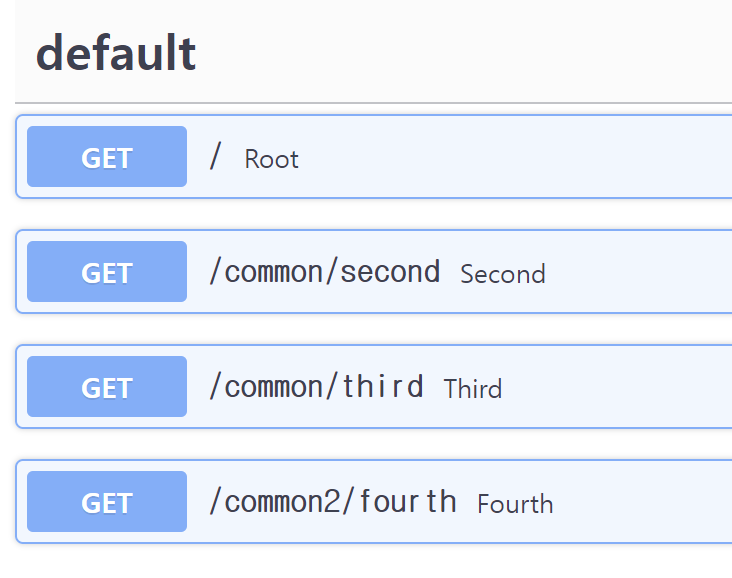
위와 같은 코드를 작성하면 아래와 같은 API 문서를 확인할 수 있습니다.

분명 각 API에 직접 작성하지는 않았지만, /common 을 공유하는 것을 확인할 수 있습니다.
마지막으로 같은 디렉토리에 routes2.py를 만들어 다음과 같은 코드를 작성해 봅니다.
from fastapi import APIRouter

router = APIRouter(
    prefix = "/common2"
)

@router.get("/fourth")
async def fourth():
    return {"fourth" : "fourth"}
마찬가지로 다음과 같이 main.py에 등록을 할 수 있습니다.
from fastapi import FastAPI
from routes import router as second
from routes2 import router as fourth

app = FastAPI()

@app.get("/")
async def root():
    return {"first": "first"}

app.include_router(second)
app.include_router(fourth)
지금은 router 파일이 2개라 위와 같이 include_router를 두번 작성해도 괜찮지만, 기능이 많아진다면 매우 귀찮아질 것입니다.
따라서 아래와 같은 방법으로 API를 등록하여 사용할 수 있습니다.
from fastapi import FastAPI
from routes import router as second
from routes2 import router as fourth

app = FastAPI()

routers = [
    second,
    fourth
]

@app.get("/")
async def root():
    return {"first": "first"}

for router in routers:
    app.include_router(router)
그림4에서 등록이 잘된것을 확인할 수 있습니다.